Sensing Lines#
Daily Goals
Understand how the XRP robot’s reflectance sensors work to detect lines.
Learn how to read values from the left and right reflectance sensors using XRPLib.
Characterize the reflectance sensors by observing the values they return over different surfaces (white, black line, partially over the line).
Determine an appropriate threshold value to differentiate between the line and the background.
Learn about conditional statements (if/else) in Python and how they can be used to make decisions based on sensor input.
Write a program that makes the XRP robot drive forward and stop when both reflectance sensors detect a line.
Introduction#
Imagine your XRP robot is playing a game where it needs to follow a path marked by a dark line on a light floor. How does it know where the line is? The answer lies in its reflectance sensors!
The XRP has two of these special sensors located underneath the front bumper. Think of them like the robot’s eyes for seeing lines. These sensors help the robot understand the surface it’s driving over without actually touching it.
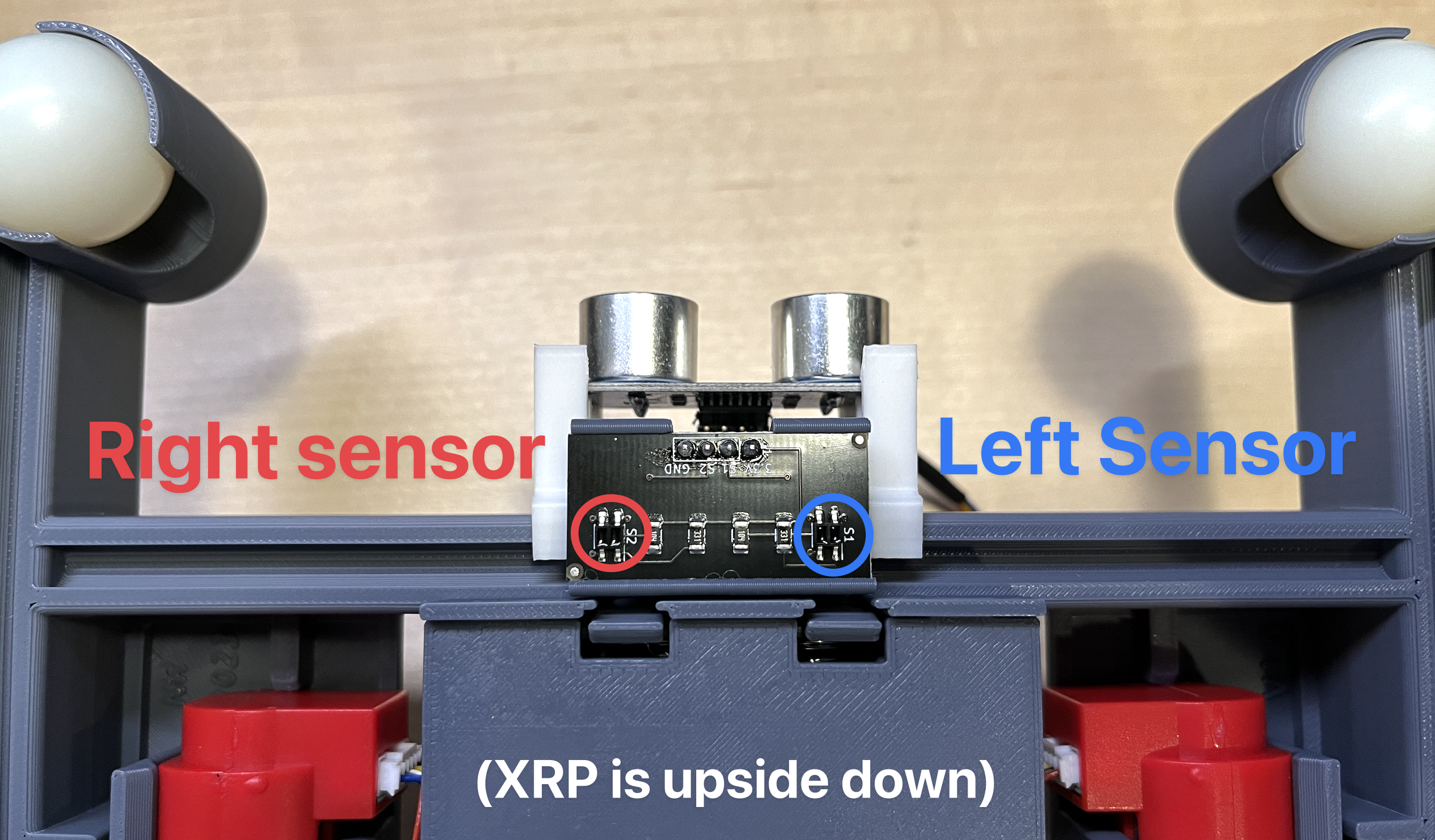
The reflectance sensor as it is mounted on the underside of the robot front bumper.#
How do these sensors work? Each one shines a tiny beam of infrared light downwards onto the ground. Infrared light is similar to the light used in your TV remote – you can’t see it with your eyes! The sensor then measures how much of this light bounces back up.
Think of it like shining a flashlight on different surfaces. If you shine it on a white piece of paper, a lot of light will bounce back into your eyes, making it look bright. But if you shine it on a dark piece of cloth, much less light will bounce back, and it will look dark.
The XRP’s reflectance sensors work in the same way. They are perfect for detecting dark lines on a light background because:
On a light surface (like white): Lots of infrared light will be reflected back to the sensor.
On a dark line (like black): Very little infrared light will be reflected back to the sensor.
The left and right sensor objects in the XRP’s programming return a value between 0.0 and 1.0. These numbers tell you how much light the sensor is detecting:
A value close to 1.0: Means the sensor is seeing a lot of reflected light, so it’s likely over a light surface.
A value close to 0.0: Means the sensor is seeing very little reflected light, so it’s likely over a dark surface (like a line).
XRPLib provides easy-to-use functions to get these values from the reflectance sensors:
from XRPLib.defaults import *

# Reads the value from the left sensor and stores it in a container called "left"
left = reflectance.get_left()

# Reads the value from the right sensor and stores it in a container called "right"
right = reflectance.get_right()
In this code, reflectance.get_left() is a command that asks the left sensor for its current reading (a number between 0.0 and 1.0). This number is then stored in a variable named left. Similarly, reflectance.get_right() gets the reading from the right sensor and stores it in the right variable.
Characterizing the sensors#
Before you start using the reflectance sensors to make your robot follow lines, it’s a good idea to get to know them better. This is like trying out a new pen to see how it writes on different types of paper. We want to understand what values the sensors report in different situations. Let’s try to find out what values the sensors return when they are:
Completely off the line (seeing a white surface): What’s the typical range of values?
Completely on the line (seeing a black surface): What’s the typical range of values now?
Partially on the line (straddling the line): What kind of values do you see in this case?
Tip
To make your testing easier, focus on one sensor at a time. You can do this by only looking at the values from either the left sensor or the right sensor. When you take a measurement, make sure that the correct sensor (left or right) is positioned directly over the line or the white surface.
Try it out
To test the sensor on the surface you’ll be using for your robot’s path, write a small program. This program should:
Choose either the left or the right reflectance sensor to test.
Read the value of that sensor.
Print the value to the screen.
Repeat steps 2 and 3 continuously in a loop as you move the robot around on the white surface and over a line.
Record the values you observe in each situation (off the line, on the line, straddling the line).
What did you learn about the sensor values? The documentation for the reflectance module in XRPLib tells us that the get_left() and get_right() functions will always give you a number between 0 and 1.
Did your sensor values ever reach exactly 0 or exactly 1? Why might that be? (Think about whether the line is perfectly black or the surface is perfectly white.)
Based on your observations, what range of values seems to indicate that the sensor is seeing the white surface?
What range of values seems to indicate that the sensor is seeing the black line?
Determining a Threshold#
Now that you have an idea of the values the sensor returns, let’s think about how we can use this information in our robot’s program. We need to decide on a threshold value.
A threshold is like a dividing line. If the sensor reading is on one side of the threshold, we can say the sensor sees a line. If it’s on the other side, we can say it doesn’t.
Given the ranges of values you found in the previous step, what number do you think would be a good threshold? This number should be somewhere in between the values you get when the sensor is clearly on the white surface and when it’s clearly on the black line. For example, if you found that white gives you values around 0.8 and black gives you values around 0.2, a threshold of 0.5 might be a good starting point.
Introduction to Conditionals#
Now that we can get values from the sensors and we have an idea of a good threshold, how do we make the robot do something based on what the sensors are telling us? This is where conditionals come in!
In Python, conditionals allow your program to make decisions. They let you tell the robot to do one thing if a certain condition is true, and maybe do something else if the condition is false. The most common way to do this is with the if statement.
Think of it like this: “IF the light is red, THEN stop. ELSE (if the light is green), THEN go.”
Here’s how an if statement looks in Python:
threshold = 0.5  # This is our example threshold value
sensor_value = reflectance.get_left() # Get the current reading from the left sensor

if sensor_value > threshold:
    print("Sensor is over the line")
else:
    print("Sensor is not over the line")
Let’s break down this code:
threshold = 0.5: This line just sets up our example threshold value. You might need to change this based on your sensor testing!
sensor_value = reflectance.get_left(): This line reads the current value from the left reflectance sensor and stores it in the sensor_value variable.
if sensor_value > threshold:: This is the start of our conditional statement. It checks if the value in sensor_value is greater than the value in threshold. If this is true (the sensor reading is high, meaning it’s likely over a light surface), then the code indented below the if will be executed.
print(“Sensor is over the line”): This line will only be executed if the condition in the if statement is true.
else:: This keyword introduces the alternative action to take if the condition in the if statement is false.
print(“Sensor is not over the line”): This line will only be executed if the condition in the if statement is false (the sensor reading is low, meaning it’s likely over a dark line).
Stopping at a Line#
Now, let’s use what we’ve learned about sensor values and conditional statements to make the XRP robot stop when it detects a line with both of its reflectance sensors.
Try it out
Write a program that will make the XRP robot drive forward. The robot should continue driving until both its left and right reflectance sensors detect a dark line. Once both sensors are over the line, the robot should stop. Use a conditional statement (an if statement) inside a loop to continuously check the sensor values.
Here’s an example of how you might write this code:
from XRPLib.defaults import *

threshold = 0.5  # Remember to use the threshold value you determined!

# Set the speed of both wheels to make the robot move forward slowly
drivetrain.set_speed(5, 5)

# We'll use these to keep track of whether each sensor is over the line
left_over_line = False
right_over_line = False

# This loop will keep running as long as *both* sensors are NOT over the line
while not (left_over_line and right_over_line):

    # Check the left sensor
    if reflectance.get_left() > threshold:
        # If the left sensor sees a dark line (value is below the threshold), set this to True
        left_over_line = True
    else:
        # If it doesn't see a line, make sure this is False
        left_over_line = False

    # Check the right sensor in the same way
    if reflectance.get_right() > threshold:
        right_over_line = True
    else:
        right_over_line = False

# Once the loop stops (meaning both sensors are over the line), stop the robot
drivetrain.stop()
Note
You can actually write the condition in the while loop in a more concise way! Instead of using the left_over_line and right_over_line variables, you can directly check the sensor values:
from XRPLib.defaults import *

threshold = 0.5  # Use your determined threshold!

# Set the speed of both wheels
drivetrain.set_speed(5, 5)

# Drive forward until both sensors detect the line
while not (reflectance.get_left() > threshold and reflectance.get_right() > threshold):
    pass # Keep doing nothing (driving forward) until the condition is met

# Stop the drivetrain
drivetrain.stop()
Try running your code! Place the XRP robot on a light surface with a dark line. Does it drive forward and stop when both sensors are over the line? If it doesn’t stop correctly, you might need to adjust your threshold value (make it higher or lower) or double-check the logic in your if and while statements.

The XRP driving forward until both sensors detect the line.#
Recap
Today, you have:
Learned that the XRP robot uses reflectance sensors to “see” lines by measuring the reflection of infrared light.
Discovered how to read the values from the left and right reflectance sensors using reflectance.get_left() and reflectance.get_right() in XRPLib.
Characterized the behavior of the reflectance sensors by observing the range of values they produce over white surfaces, black lines, and when partially covering a line.
Understood the importance of choosing an appropriate threshold value to distinguish between the line and the background based on sensor readings.
Been introduced to conditional statements (if/else) in Python and how they allow your robot to make decisions based on sensor data.
Written a Python program that makes the XRP robot drive forward and automatically stop when both of its reflectance sensors detect a dark line.